

|
|
MCP servers are here to stay, so let's ready our tool belts
TL;DR
- MCP servers are a fast-growing, under-tested attack surface (~100k hits for “MCP” on Shodan, multiple critical CVEs in the last month).
- Burp Suite has no dedicated tooling for them as of today — so we wrote MCPwned: an extension that:
- detects MCP traffic
- enumerates capabilities
- pre-fills Repeater payloads for tool-argument fuzzing.
Introduction
LLM-based AIs are the next big thing today. And such a hype inevitably caused an ecosystem to develop around them extremely fast.
In late 2024 Anthropic released the Model Context Protocol standard with the objective of enabling LLM agents to interact with external systems in a model-agnostic way. In a little over a year, this protocol has been adopted by a variety of industry players ranging from LLM providers such as openAI to major projects such as Nginx and even tools such as Burp Suite.
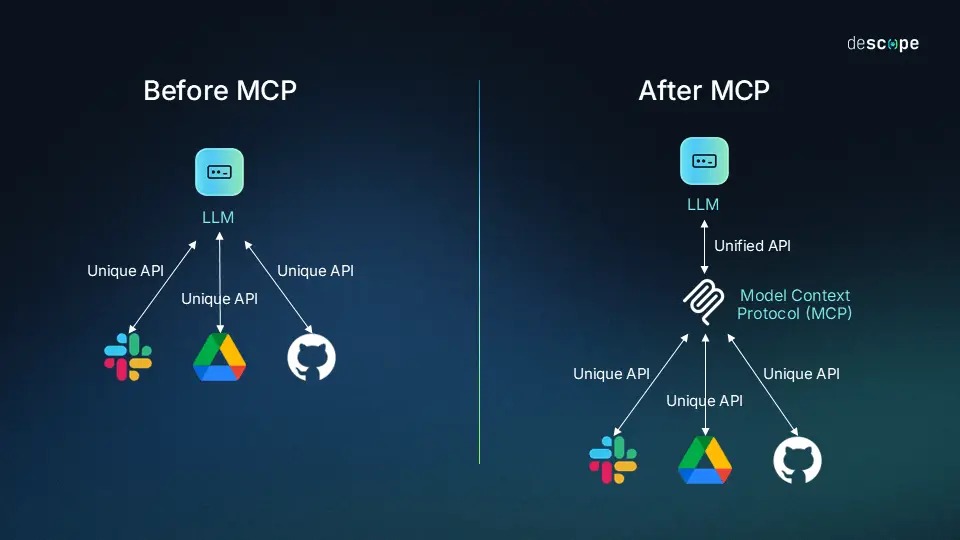
This blog post quickly outlines the MCP protocol before presenting a Burp Suite extension developed by Fenrisk that enables pentesters to effectively test MCP servers.
What exactly is MCP?
MCP enables clients (AI agents) to access capabilities which are tools, resources, and prompts (to provide the agent with some context) from a server. Such server can be pretty much anything as long as it exposes its capabilities using MCP, and it is something the user would want the AI to interact with. As an example a design software may expose some capabilities to help your local agent edit your files in this very software.
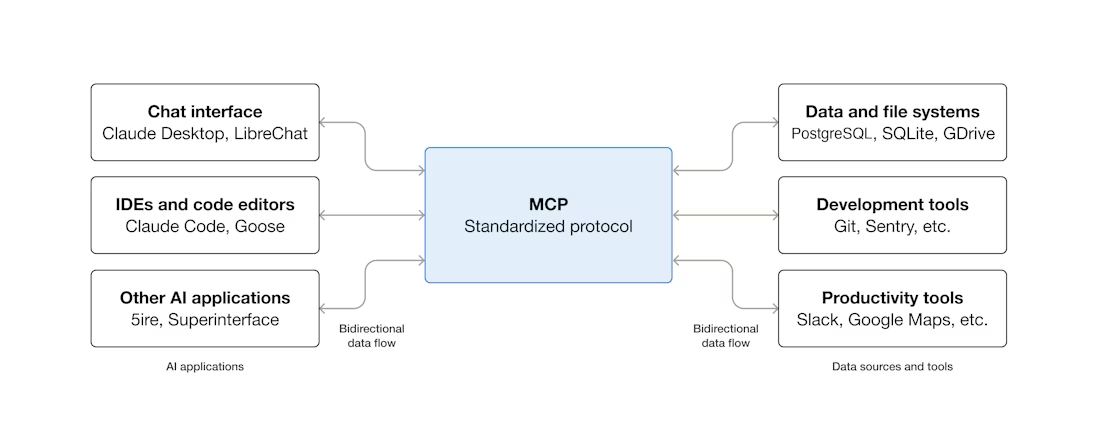
The connection between an MCP client and an MCP server can either happen through local STDIO transport when running on the same machine or through Streamable HTTP for remote servers. The messages are encoded as JSON-RPC and contain session IDs and incremental message IDs. By default, there is no authorization baked in, although it can be added.
This, combined with the fact that the MCP servers are not meant for humans to access them (even though they definitely can) can lead the developers to treat MCP as less exposed than the rest of their public facing attack surface. This, in turn, can lead to looser input validation or lack of proper authorization. Overall, the maturity of this ecosystem is still quite low, which is natural given its youth and fast growth.
A quick example of an MCP server and exchange
Here is for instance a sample server code that provides only one tool using FastMCP:
from fastmcp import FastMCP
import subprocess

mcp = FastMCP("Minas Tirith Battle Supplies")

@mcp.tool()
def light_beacon(beacon_name: str) -> str:
    try:
        output = subprocess.check_output(f"ping -c 1 {beacon_name}", shell=True, text=True)
    except Exception as e:
        raise Exception(f"Beacon tower '{beacon_name}' is unreachable. The signal cannot be lit.")
    return f"The beacon of {beacon_name} is lit! Gondor calls for aid.\n\n{output}"

mcp.run(transport="streamable-http", host="0.0.0.0", port=8000)
This code hosts the Minas Tirith Battle Supplies MCP server (yes, our whole internal training lab on MCP is Gondor-themed) on port 8000 with the provided light_beacon tool. (Note the shell=True — this tool is intentionally vulnerable to command injection, which we'll exploit in the Repeater demo below.)
Now assume a client wants to connect to it, the messages exchanged in MCP would be as follows:
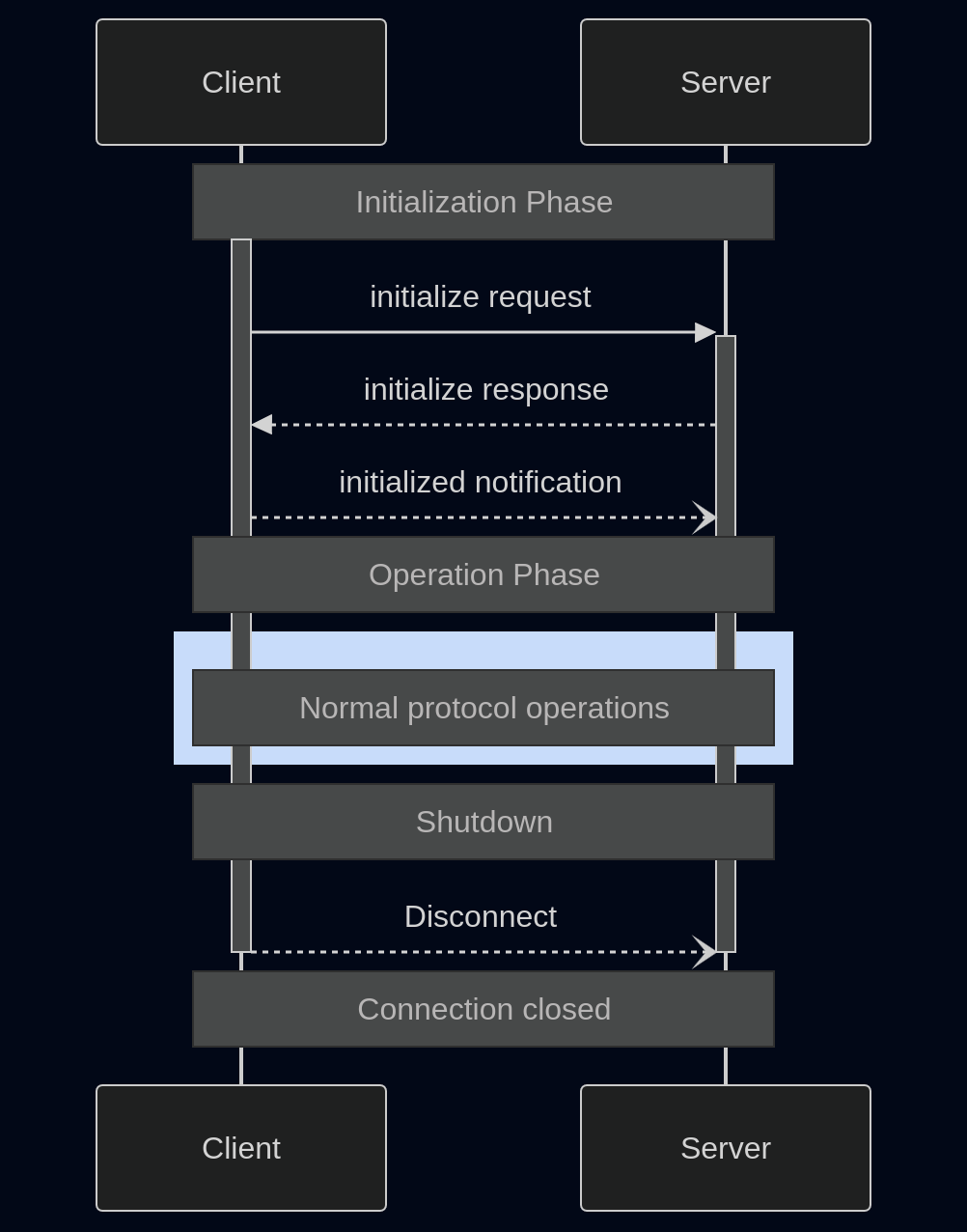
- First the client initializes a connection to the server in a 3-way handshake. They negotiate the protocol version as well as exchange a great deal of information:
- Their respective names
- The
capabilitiestypes that can be provided (Does the server support resources? tools? … ) - A session ID may be set by the server in the response
- Once the session is established, we enter the operation phase and the client can query the list of all available
toolsfor instance - In our case the server would answer that the only tool is
light_beaconas well as all the information related to the tool (expected arguments and types, a short description …)
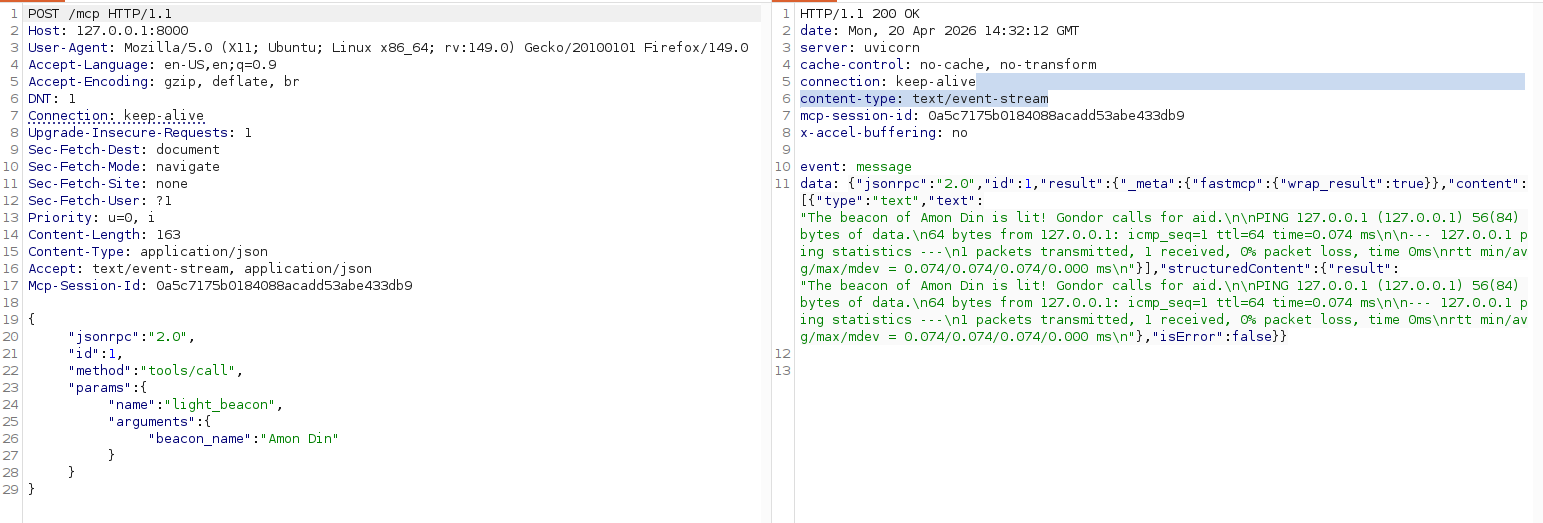
Assume we want to use the light_beacon tool, we would send a request such as:
POST /mcp HTTP/1.1
...
Content-Type: application/json
Accept: text/event-stream, application/json
Mcp-Session-Id: 4ee9dfeccb8148fbb0f4d6fabb220600

{
  "jsonrpc": "2.0",
  "id": 1,
  "method": "tools/call",
  "params": {
    "name": "light_beacon",
    "arguments": {
      "beacon_name": "..."
    }
  }
}
And the server will answer like this:
HTTP/1.1 200 OK
...
content-type: text/event-stream
mcp-session-id: 4ee9dfeccb8148fbb0f4d6fabb220600

event:message
data:{"jsonrpc":"2.0","id":1,"result":{"_meta":{"fastmcp":{"wrap_result":true}},"content":[{"type":"text","text":"..."}],"structuredContent":{"result":"..."},"isError":false}}
Here is a full request example captured in Burp:
A growing attack surface
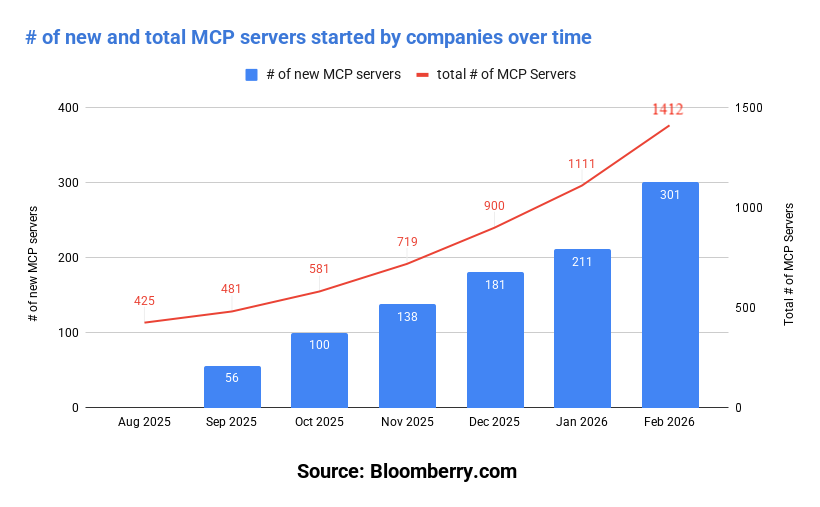
The rate at which new MCP servers are deployed is rapidly growing. A quick search on Shodan for "MCP" gives about 100,000 entries at the time of writing. One interesting takeaway from the Shodan results is that it contains well known corporations, AI startups, but also personal domain names. This means that both the trillion-dollar company, and the random guy in his basement are rushing to deploy internet-facing MCP servers.
For the official company-operated front-facing MCP servers, the growth seems to be accelerating as per this insightful blog post from bloomberry:
Various studies (such as this great article) show that a lot of MCP servers do not follow basic security principles (credential protection, supply chain awareness, Principle of Least Privilege). This corroborates the aforementioned maturity of the ecosystem, as we are still in the "move fast break things" stage.
In the past weeks only, critical CVEs have been found such as a missing authentication bug on Nginx web servers allowing an attacker to perform privileged operations or a command injection in AWS's MCP server. And of course the latest addition: the Remote Code Execution vulnerability that lead to more than 10 CVEs disclosed last week by Ox Security.
At the time of writing, few standalone tools and no extension on the Burp Suite BApp Store provide a clear and efficient way to list all capabilities provided by an MCP server, hence the creation of this first iteration. We have seen MCP servers cropping up lately in a growing number of our penetration tests and a proper way of testing their security becomes necessary.
MCPwned
Tool presentation
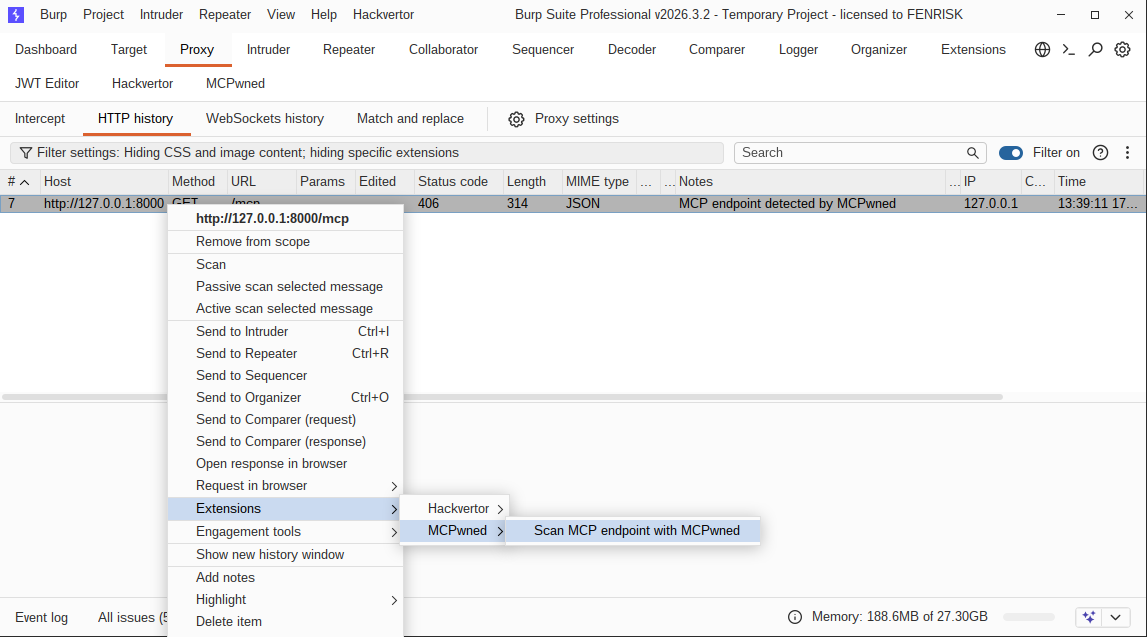
MCPwned passively monitors requests being made and flags those that might be MCP requests in gray. These requests can then be sent to the extension tab (classical keyboard shortcuts such as Ctrl + M and Ctrl + Shift + M also work):
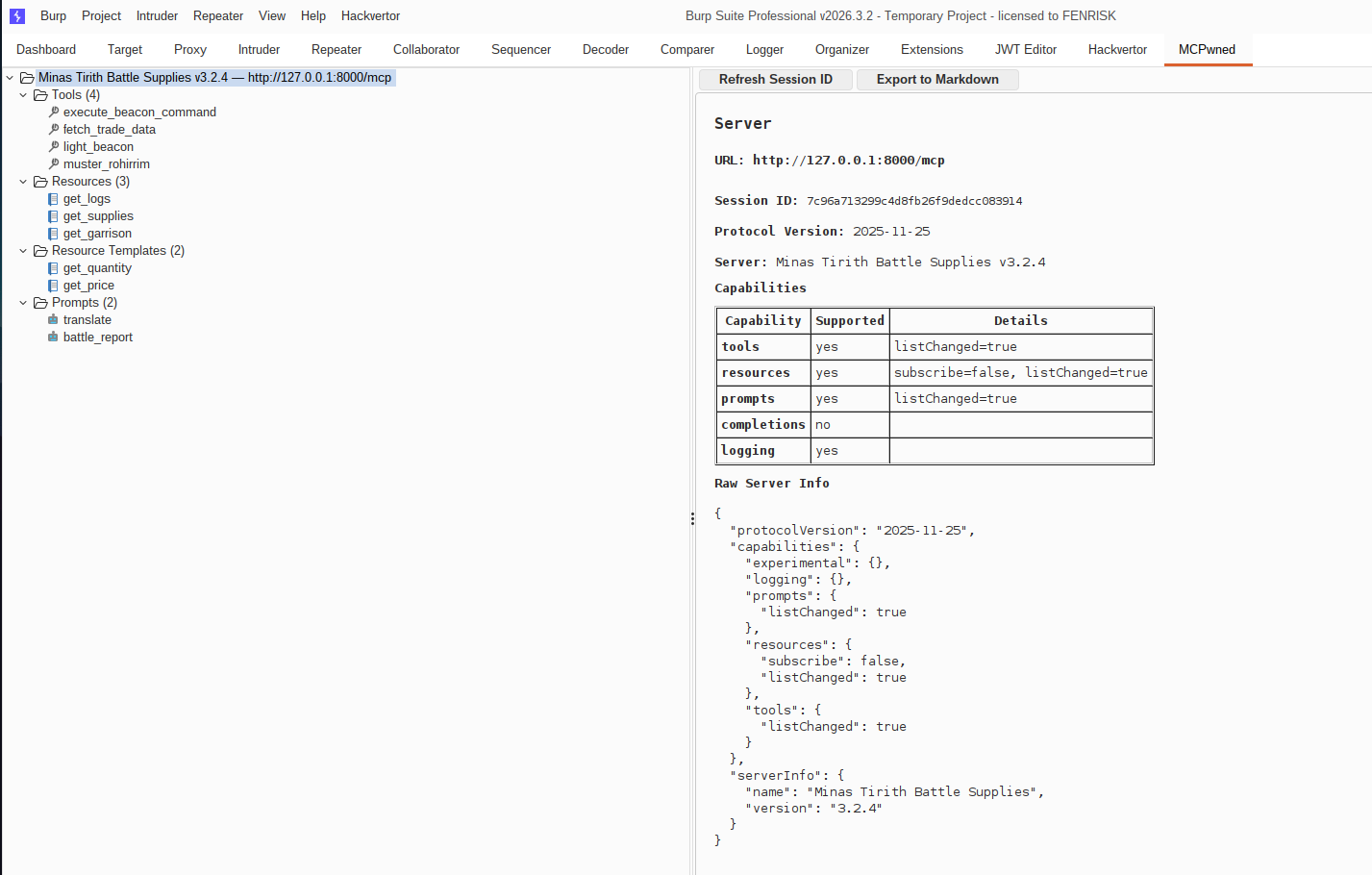
The extension then gathers all information regarding the server including its protocol version, its capabilities and gets a session ID that will be usable afterward:
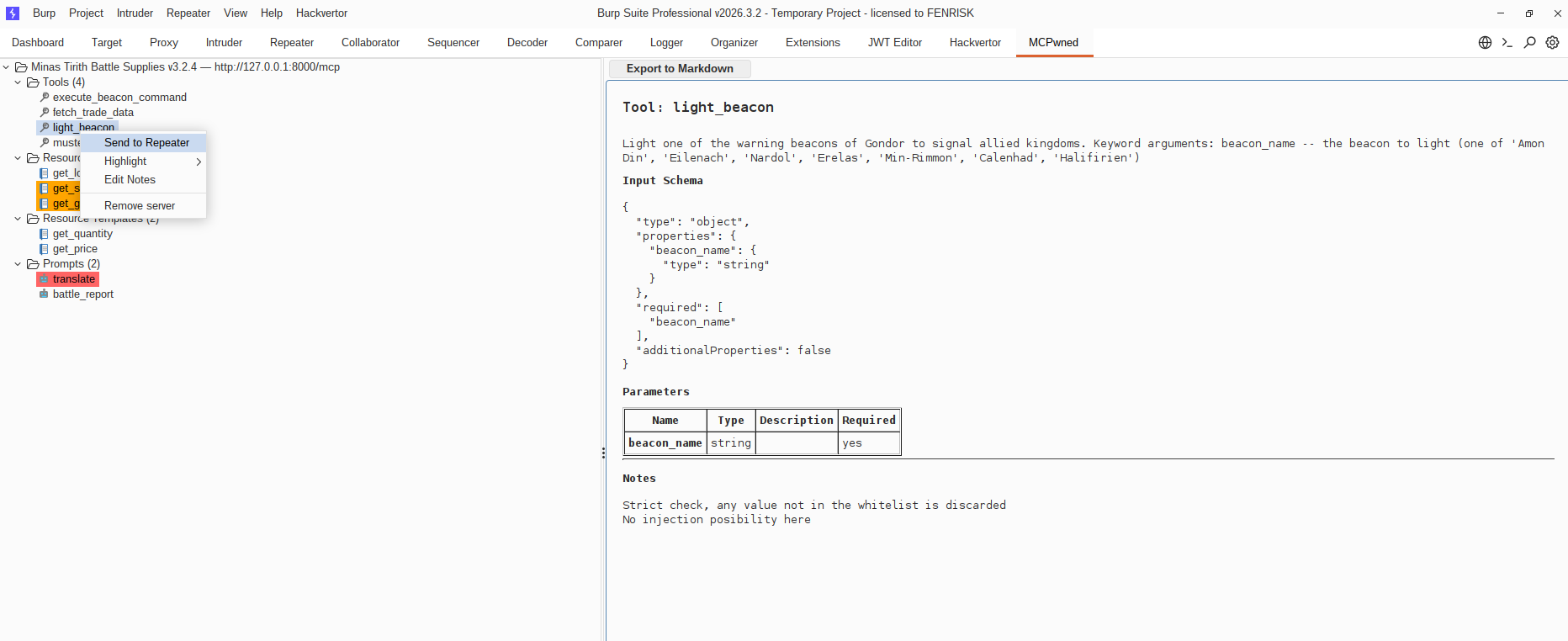
The extension provides the ability to inspect capabilities and replay them in the repeater. It supports adding notes or color tagging, and can also export to markdown to help with the reporting stage:
In the repeater tab, sent requests will be already pre-filled with a proper template that can be used by the auditor (for instance below, the auditor just had to replace the TODO with x; cat /etc/passwd)
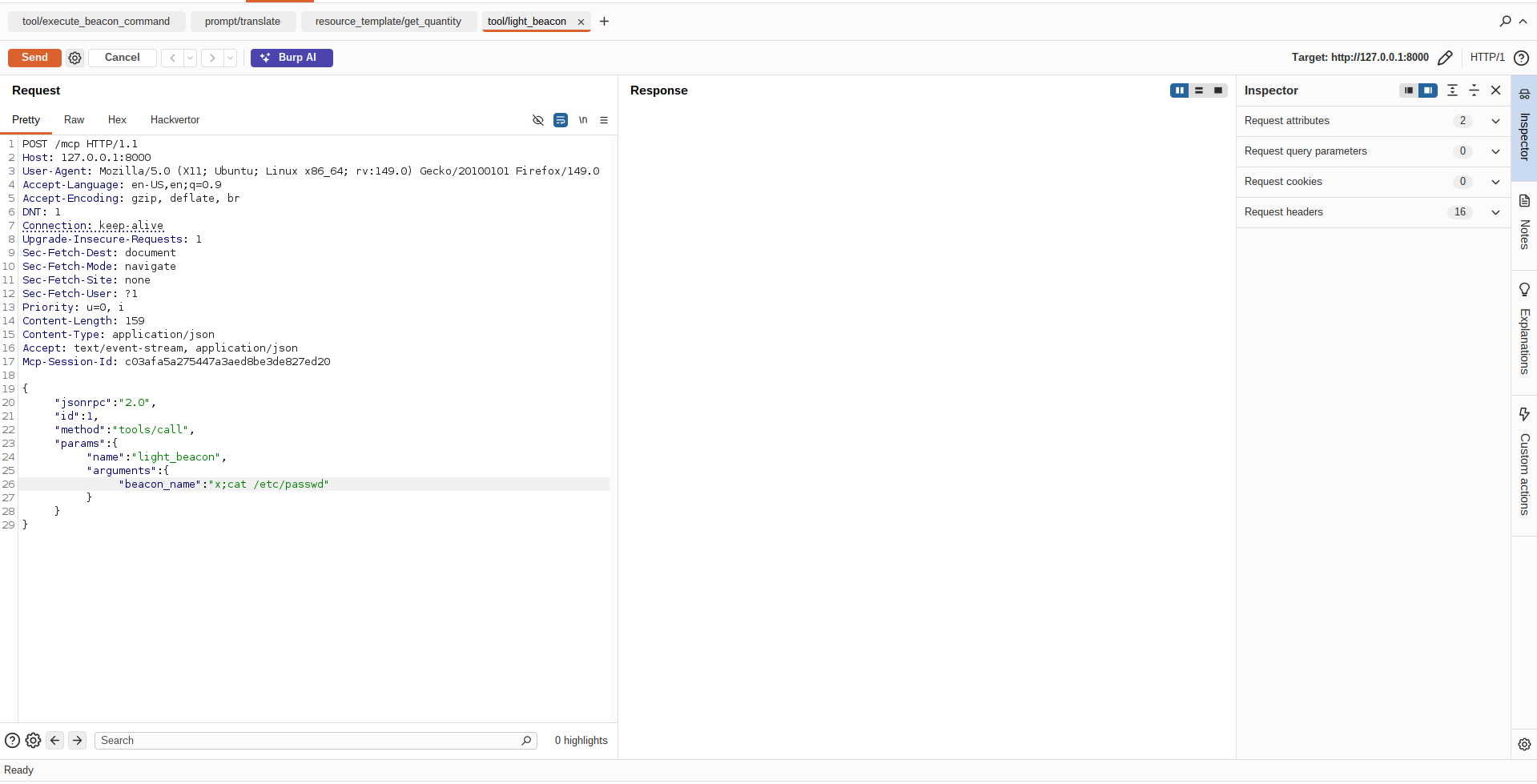
(This is the function we defined in the code example above, looks like it was vulnerable to command injection)
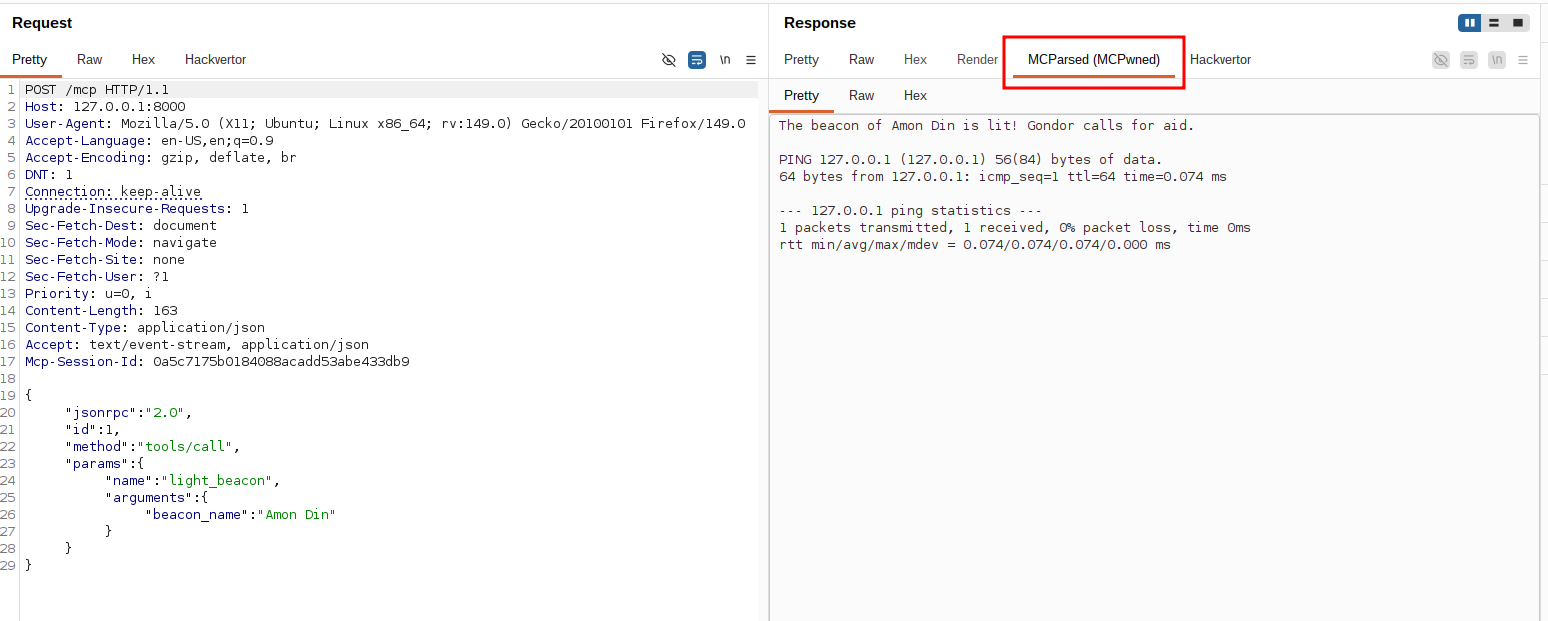
The extension also provides a way to automatically parse the sometimes a bit chunky MCP answer messages (contrast this with the request in the code example section):
Technical challenges
This extension is only a first step as it does not handle all possible cases of the Transports specifications of MCP. The lack of easy out-of-the-box support for SSE in Burp Suite (Burp's api.http().sendRequest() throws RuntimeException: Streaming response received when the server returns SSE) means that as of now a few requests for probing are done through the official MCP Java SDK. This sadly means that these requests do not go through the Burp Suite Logger.
This first version of the extension also does not handle WebSocket-based MCP (which is less than 10% of the deployed servers, but still significant enough).
Future work
We plan on improving the tool and adding other features including but not limited to:
- Using Burp Suite's native requests for the probing part and supporting websockets. We wanted to release a first version with the official SDK workaround before delving into this specific issue which may be due to a misunderstanding of the way Burp Suite handles SSE.
- Per-implementation scan (detecting whether the server is using fastMCP/Python SDK, Spring Java MCP, RMCP, and providing known vulnerabilities)
- Burp Suite scan support to auto-detect MCP endpoints
- Support for newest MCP features such as tasks
We have submitted our extension to the Burp Suite BApp Store. In the meantime you can manually install our extension using the .jar file provided in the release section of our repository.
Feel free to open issues/feature requests or merge requests if you want to report a bug, suggest a feature or contribute!